Constants are like a variable except that once defined, their value never changes during the program's execution. In this tutorial, you will learn about Constants in C++.
Table of Contents
What are Constants?
Constants refer to as fixed values; Unlike variables whose value can be changed, constants - as the name implies, do not change; They remain constant. A constant must be initialized when created, and new values cannot be assigned to it later.
- Constants are also called literals.
- Constants can be any of the data types.
- It is considered best practice to define constants using only upper-case names.
Constant Definition in C++
There are two other different ways to define constants in C++. These are:
- By using the
constkeyword - By using
#definepreprocessor
Constant Definition by Using const Keyword
Syntax:
const type constant_name;Example:
#include <iostream>
using namespace std;

int main()
{
    const int SIDE = 50;
    int area;
    area = SIDE*SIDE;
    cout<<"The area of the square with side: " << SIDE <<" is: " << area << endl;
    system("PAUSE");
    return 0;
}
Program Output:
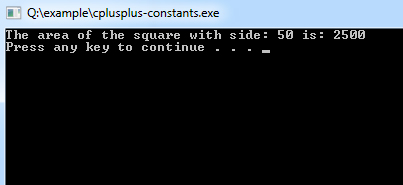
It is also possible to put const either before or after the type.
int const SIDE = 50;or
const int SIDE = 50;Constant Definition by Using #define preprocessor
Syntax:
#define constant_name;Example:
#include <iostream>
using namespace std;

#define VAL1 20
#define VAL2  6
#define Newline '\n'

int main()
{
    int tot;
    tot = VAL1 * VAL2;
    cout << tot;
    cout << Newline;
}