The C++ switch Statement selects a code block to be executed from multiple code blocks based on the condition being evaluated once. This tutorial will teach you how to use the switch Statements in C++.
The standard format of the switch statement is:
Syntax:
switch(variable)
{
    case 1:
    //execute your code
    break;

    case n:
    //execute your code
    break;

    default:
    //execute your code
}
After the end of each case block within a switch, it is necessary to insert a break statement because if programmers do not use the break statement, all blocks will execute continuously in every case, even after the case block is matched.
An example of a C++ program to demonstrate a switch statement:
Example:
#include <iostream>
using namespace std;
main()
{
    int a;
    cout << "Please enter a no between 1 and 5: " << endl; cin >> a;

    switch(a)
    {
        case 1:
        cout << "You chose One" << endl;
        break;

        case 2:
        cout << "You chose Two" << endl;
        break;

        case 3:
        cout << "You chose Three" << endl;
        break;

        case 4:
        cout << "You chose Four" << endl;
        break;

        case 5:
        cout << "You chose Five" << endl;
        break;

        default :
        cout << "Invalid Choice. Enter a no between 1 and 5" << endl;
    }
    system("PAUSE");
}
Program Output:
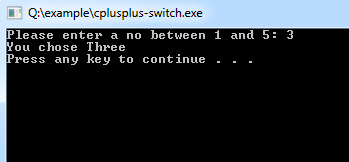
The default case will be executed when neither case evaluates to true, and the default statement does not require a break statement.