Generative AI creates new text, images, audio, code, and other content from an input. You may use it to draft a message, summarize a document, brainstorm designs, or explain a concept. It can save time, but it can also produce a polished answer that is incomplete or wrong. To use it well, understand what it receives, what it generates, and how to check the result.
This tutorial focuses on the beginner concepts that stay useful as products change. It does not depend on one provider, model name, or release. You will learn how a prompt and its context shape an output, why a model can invent details, and how to make a simple review process part of your work.
How is generative AI different from classification?
A classifier chooses from known categories: “spam” or “inbox,” for example. A generative system creates a response: perhaps an email, an explanation, or an image. Both can use machine learning, and one application may combine them. A support product might classify a question first, retrieve a relevant policy, and then generate a draft reply.
| Task | Example input | Example output |
|---|---|---|
| Classification | “My order has not arrived” | Delivery issue |
| Generation | “Draft a helpful reply using this delivery policy” | A new reply for a person to review |
| Retrieval | “Find the current delivery policy” | A matching source document |
Retrieval is not itself generation. Combining retrieval with generation can ground a reply in supplied material, but you still need to confirm that the material is current and the reply reflects it accurately.
What are a prompt, context, and output?
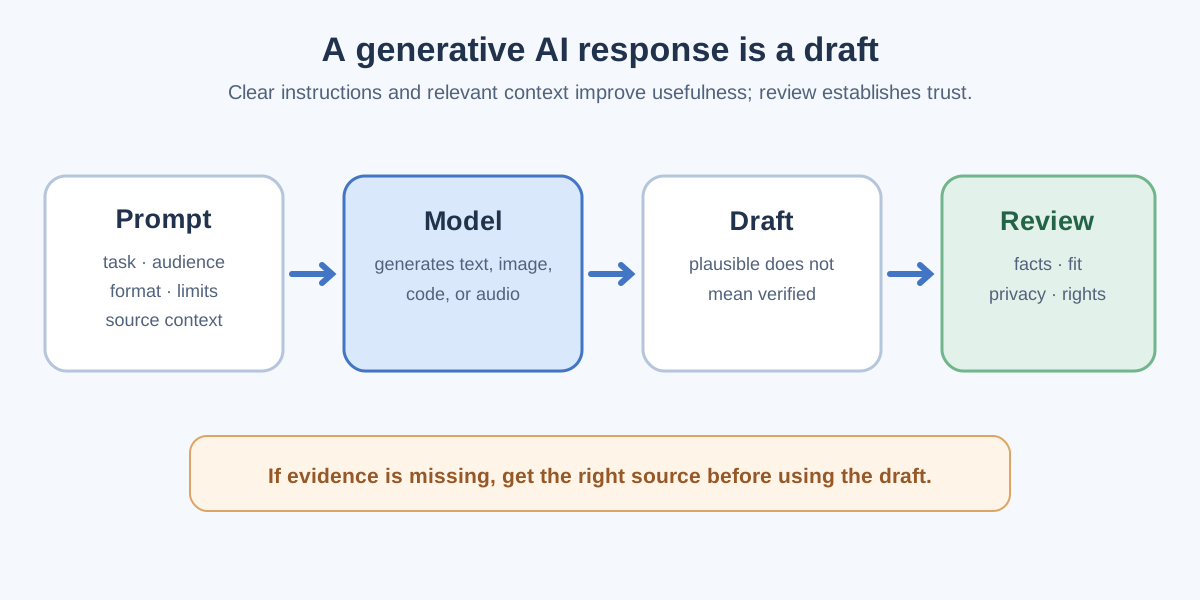
A prompt is the instruction or input you give a generative system. Context is the information available with that input, such as a document, earlier messages, or a list of requirements. The output is the content the system produces. Clear context can improve relevance, but it does not guarantee truth.
Example: Improve a vague prompt
A vague request is “Write about our refund policy.” A more useful request is: “Draft a 100-word reply to a customer who asks when a refund will arrive. Use only the policy text below. If the policy does not give a time frame, say that clearly. Keep a calm tone and do not promise a date.” The second prompt gives a task, audience, length, source boundary, and rule for missing information.
After receiving the draft, compare each factual statement with the policy. If the policy is absent, outdated, or ambiguous, the right next step is to get the correct policy—not to keep asking the model for a more confident answer.
How does a text model generate a response?
Many text generators are large language models (LLMs). During training, they learn statistical patterns from large amounts of data. At request time, a model processes the available text as tokens—pieces of text rather than necessarily whole words—and predicts a sequence of further tokens. That process can produce coherent writing, code, or explanations.
Token prediction does not give the model direct access to truth. It can describe a real fact, blend two different facts, or invent a plausible detail. Its answer can also depend on the exact prompt, context, model version, and system settings. That is why fluent wording must be checked independently when the information matters.
What are context limits and missing information?
A model can only use the information available to it in the current interaction and what it learned during training. A product may let you attach documents or retrieve them from a database, but it may also have limits on how much material it can process at once. If a long document is cut off, buried, or unclear, the output may omit an important condition.
For document-based work, give the smallest relevant source section and ask the model to identify where each important claim came from. Then inspect the source yourself. A citation that merely looks realistic is not proof the cited text exists or supports the claim.
What should you verify before using the output?
- Facts: Check dates, names, figures, quotations, and cited claims against an appropriate source.
- Completeness: Look for missing exceptions, conditions, and edge cases.
- Fit: Confirm the response matches the audience, purpose, and required format.
- Safety and privacy: Avoid sharing secrets or personal data unless you are authorized and the tool is approved for it.
- Originality: Edit the result and check that it does not reproduce material you do not have rights to use.
The amount of review should match the stakes. Brainstormed headings need editorial judgment. Medical, legal, security, and financial guidance need qualified review and current authoritative information before anyone acts on them.
When should you use a different tool?
Generative AI is not always the simplest answer. Use a calculator for exact arithmetic, a database query for a known record, a search or documentation page for a current rule, and a deterministic test for whether code passes. You can still ask a generative model to explain a result, but keep the authoritative check outside the model.
Tip: Treat an AI-generated answer as a draft with an owner. Decide who reviews it, which source establishes the facts, and what to do when the source is missing.
Conclusion
Generative AI turns a prompt and its available context into new content. Its strength is fast drafting and transformation; its limit is that plausible wording can hide mistakes. Give clear instructions, supply appropriate source material, protect private data, and verify important claims before using an output. These habits remain valuable even as models and products improve.