Language models process text as tokens, not as whole pages. A token can be a word, part of a word, punctuation, or another piece chosen by the model's tokenizer. A context window limits how much tokenized material a model can use for one response.
These ideas help you understand why a long document may not fit in one request and why an early detail in a conversation can be missed.
What Is a Token?
A tokenizer splits text into pieces and maps them to numerical IDs. A common word may fit in one token, while a rare name may need several. Spaces and punctuation can change the split. Different models can tokenize the same text differently, so word count is not an exact token count.
Example:
Text: unhelpful!
Possible pieces: un | helpful | !
This is an illustration, not the exact output of a particular tokenizer. It shows why one written word can use multiple tokens. For an exact count, use the tokenizer for the model you plan to use.
Input text and generated text use tokens. Earlier conversation, retrieved passages, and tool results can add to the input. Images and audio may be processed differently, so their usage cannot be estimated by counting nearby visible words.
What Fits in a Context Window?
The context window is the material available while the model produces a response. Depending on the application, it can include instructions, the current question, earlier turns, and supplied documents. The prompt and generated output must fit within the model's limit; the application may also set a smaller practical limit.
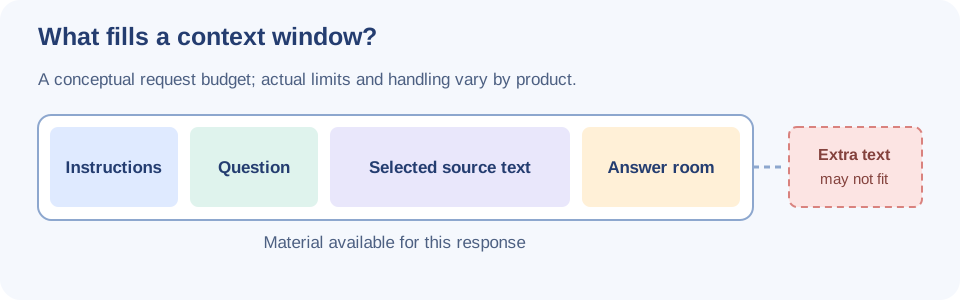
| Material | Why it may be included |
|---|---|
| Instructions | Define the task and response rules. |
| Current question | States what the user needs now. |
| Earlier turns | Provide relevant conversation details. |
| Selected documents | Supply facts not already in the request. |
| Generated answer | Needs room within the model's limit. |
If the combined material is too long, an application may reject the request, shorten the input, summarize earlier turns, or omit some content. The behavior depends on the product. A larger window does not guarantee that every detail will be used correctly.
Work Through a Document Question
Suppose you ask about a 40-page return policy. Pasting the whole document may bury the relevant rule and its exceptions. Choose the parts that answer the question while keeping the necessary context.
- State the question: “How long can a customer request a refund?”
- Provide the current policy section covering the period and exceptions.
- Ask the model to point to the sentence supporting its answer and say when the excerpt is insufficient.
- Compare the answer with the original policy before using it.
This is not simply a matter of using fewer tokens. Removing an exception to save space can make the answer misleading. For a large document collection, a retrieval system can select relevant passages for each question.
Why Can a Long Conversation Drift?
As a chat grows, an application may compress or omit early turns. A model can also miss a detail that is still present. For important work, restate the current goal and essential constraints close to the new request.
Example:
Use Python 3. Show a complete runnable example and its expected
output. Do not use packages that need installation.
This is clearer than assuming the model will remember those requirements from many turns earlier. Keep a short project brief for decisions and source details that must survive a long conversation.
Note: Tokenization is an input-processing step, not a fact check. A response can be fluent and still contain a made-up detail. Verify important answers against their sources.
Conclusion
Tokens measure pieces of input and output; the context window limits how much can be used for one response. Supply enough relevant context, leave room for the answer, restate critical constraints, and check claims that matter.