Java switch statement is used when you have multiple possibilities for the if statement.
The basic format of the switch statement is:
Syntax:
switch(variable)
{
case 1:
   //execute your code
break;

case n:
   //execute your code
break;

default:
   //execute your code
break;
}
After the end of each block it is necessary to insert a break statement because if the programmers do not use the break statement, all consecutive blocks of codes will get executed from each case onwards after matching the case block.
Example of a Java Program to Demonstrate Switch Statement
Example:
public class Sample {

 public static void main(String args[]) {
  int a = 5;

  switch (a) {
   case 1:
    System.out.println("You chose One");
    break;

   case 2:
    System.out.println("You chose Two");
    break;

   case 3:
    System.out.println("You chose Three");
    break;

   case 4:
    System.out.println("You chose Four");
    break;

   case 5:
    System.out.println("You chose Five");
    break;

   default:
    System.out.println("Invalid Choice. Enter a no between 1 and 5");
    break;
  }
 }
}
Program Output:
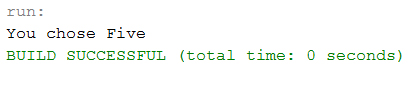
When none of the cases is evaluated to true, the default case will be executed, and break statement is not required for default statement.